Architecture

How It Works (Simple Explanation)
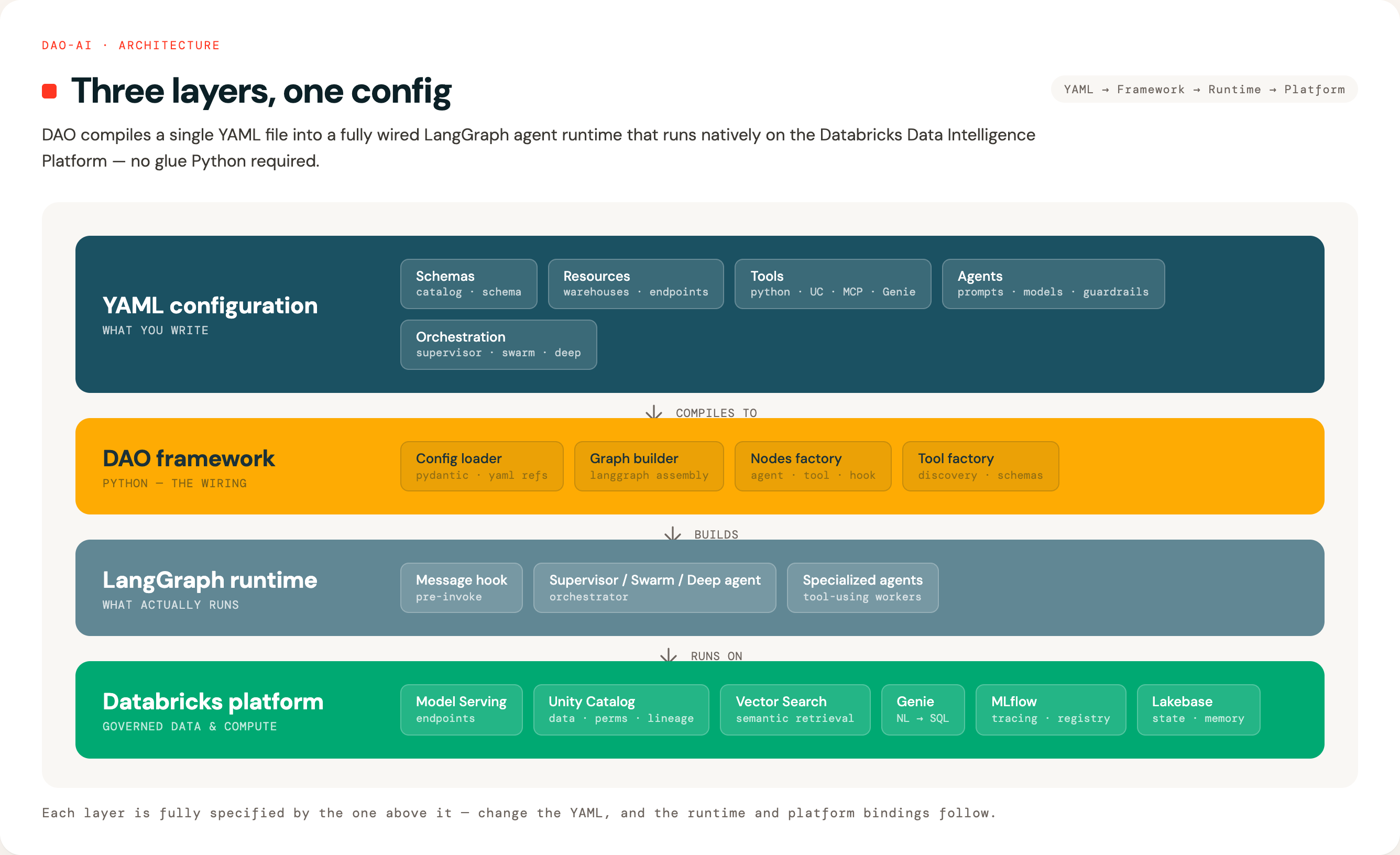
Think of DAO as a three-layer cake:
1. Your Configuration (Top Layer) 🎂
You write a YAML file describing what you want: which AI models, what data to access, what tools agents can use.
2. DAO Framework (Middle Layer) 🔧
DAO reads your YAML and automatically wires everything together using LangGraph (a workflow engine for AI agents).
3. Databricks Platform (Bottom Layer) ☁️
Your deployed agent runs on Databricks, accessing Unity Catalog data, calling AI models, and using other Databricks services.
Technical Architecture Diagram
For developers and architects, here's the detailed view:
System-Level Data Flow
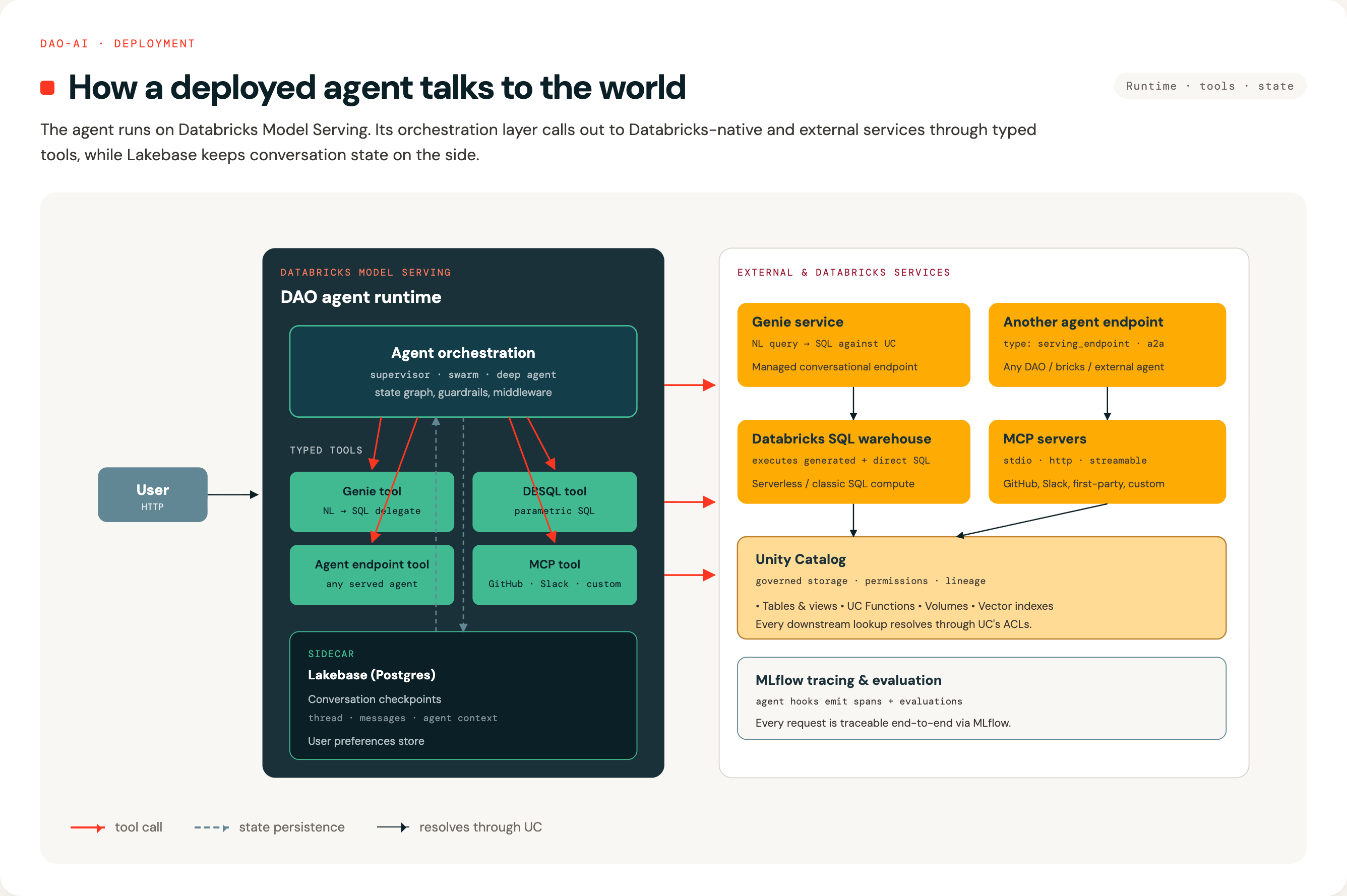
This diagram shows how a deployed DAO agent integrates with Databricks services and external systems:
Data Flow Explanation
1. User Interaction - User sends a request to the DAO agent via Databricks Model Serving endpoint - Request includes message, conversation ID, and user context
2. Agent Processing - Agent orchestration layer (Supervisor or Swarm) processes the request - Determines which tools to invoke based on the user's question - Multiple agents may collaborate to answer complex queries
3. Tool Integration Patterns
A. Genie Tool → Genie Service → DBSQL - Agent invokes Genie tool with natural language question - Genie service translates NL to SQL query - Executes against Databricks SQL / Unity Catalog - Returns structured data results - Use case: "What products are low on stock?"
B. Direct DBSQL Tool - Agent calls SQL warehouse directly with pre-defined SQL - Executes Unity Catalog functions or queries - Returns data from governed tables - Use case: Execute a stored procedure or predefined query
C. Agent Endpoint Tool - Agent calls another deployed agent endpoint - Enables composition and specialization - Other agent may use different tools/models - Use case: Call a specialized HR agent from a general assistant
D. MCP Tool - Agent communicates with external MCP server - Supports GitHub, Slack, custom APIs - Extends agent capabilities beyond Databricks - Use case: Create GitHub issue, send Slack message
4. State Persistence - Conversation state saved to Lakebase checkpointer (PostgreSQL table) - User preferences stored in Lakebase store (Unity Catalog governed) - Enables multi-turn conversations and personalization - Survives agent restarts and scales across instances
5. Security & Governance - On-Behalf-Of User: Requests execute with caller's permissions - Unity Catalog: Row/column-level security enforced - Audit Logs: All data access tracked per user - Isolation: Conversation state partitioned by user/thread
Orchestration Patterns
When you have multiple specialized agents, you need to decide how they work together. DAO supports two patterns:
Think of it like a company: - Supervisor Pattern = Traditional hierarchy (manager assigns tasks to specialists) - Swarm Pattern = Collaborative team (specialists hand off work to each other)
DAO supports both approaches for multi-agent coordination:
1. Supervisor Pattern
Best for: Clear separation of responsibilities with centralized control
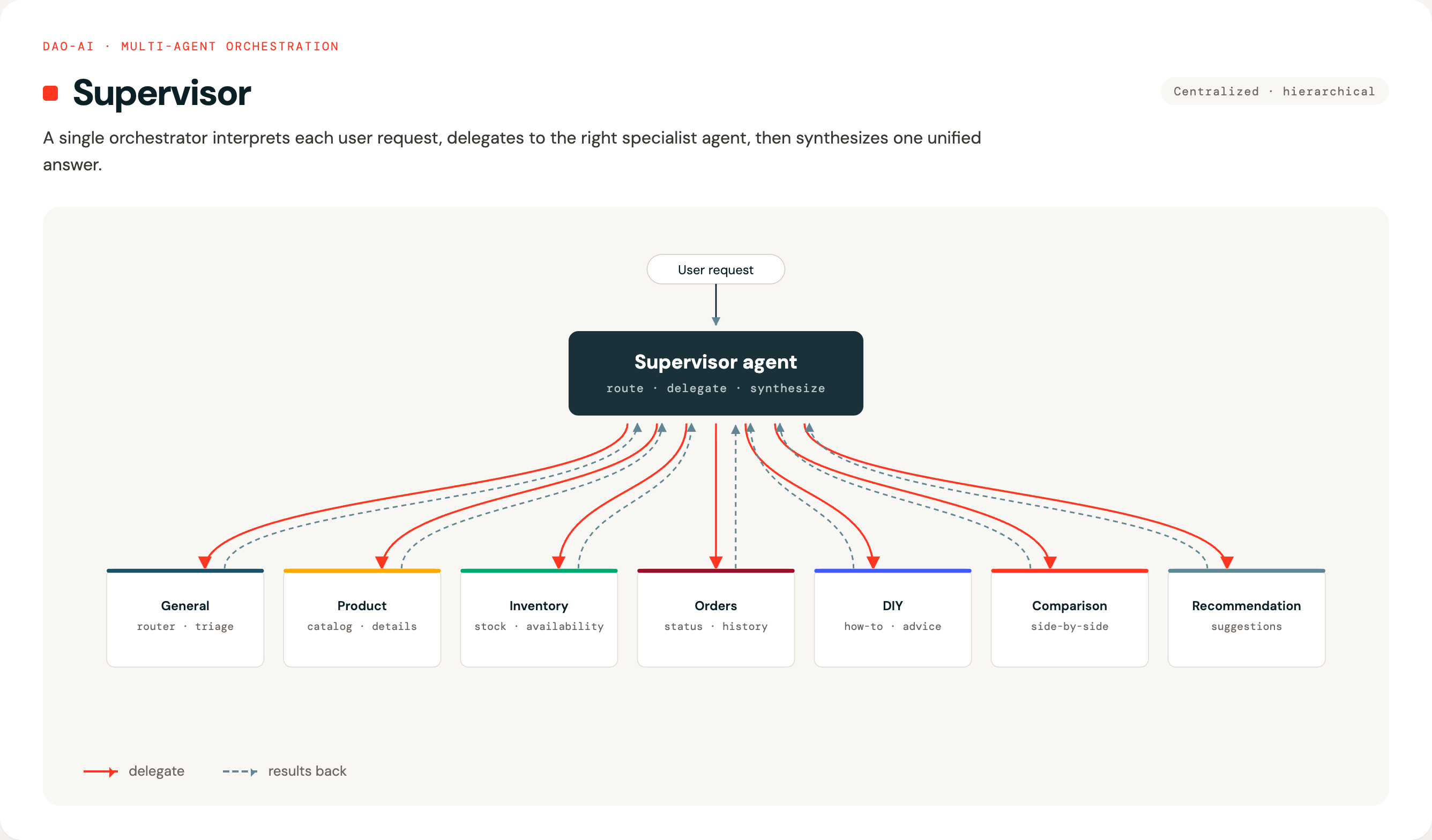
A central "supervisor" agent reads each user request and decides which specialist agent should handle it. Think of it like a call center manager routing calls to different departments.
Example use case: Hardware store assistant
- User asks about product availability → Routes to Inventory Agent
- User asks about order status → Routes to Orders Agent
- User asks for DIY advice → Routes to DIY Agent
- User asks for product details → Routes to Product Agent
- User wants product comparison → Routes to Comparison Agent
- User needs product suggestions → Routes to Recommendation Agent
- General inquiries → Routes to General Agent
Configuration:
orchestration:
  supervisor:
    model: *router_llm
    prompt: |
      Route queries to the appropriate specialist agent based on the content.
2. Swarm Pattern
Best for: Complex, multi-step workflows where agents need to collaborate
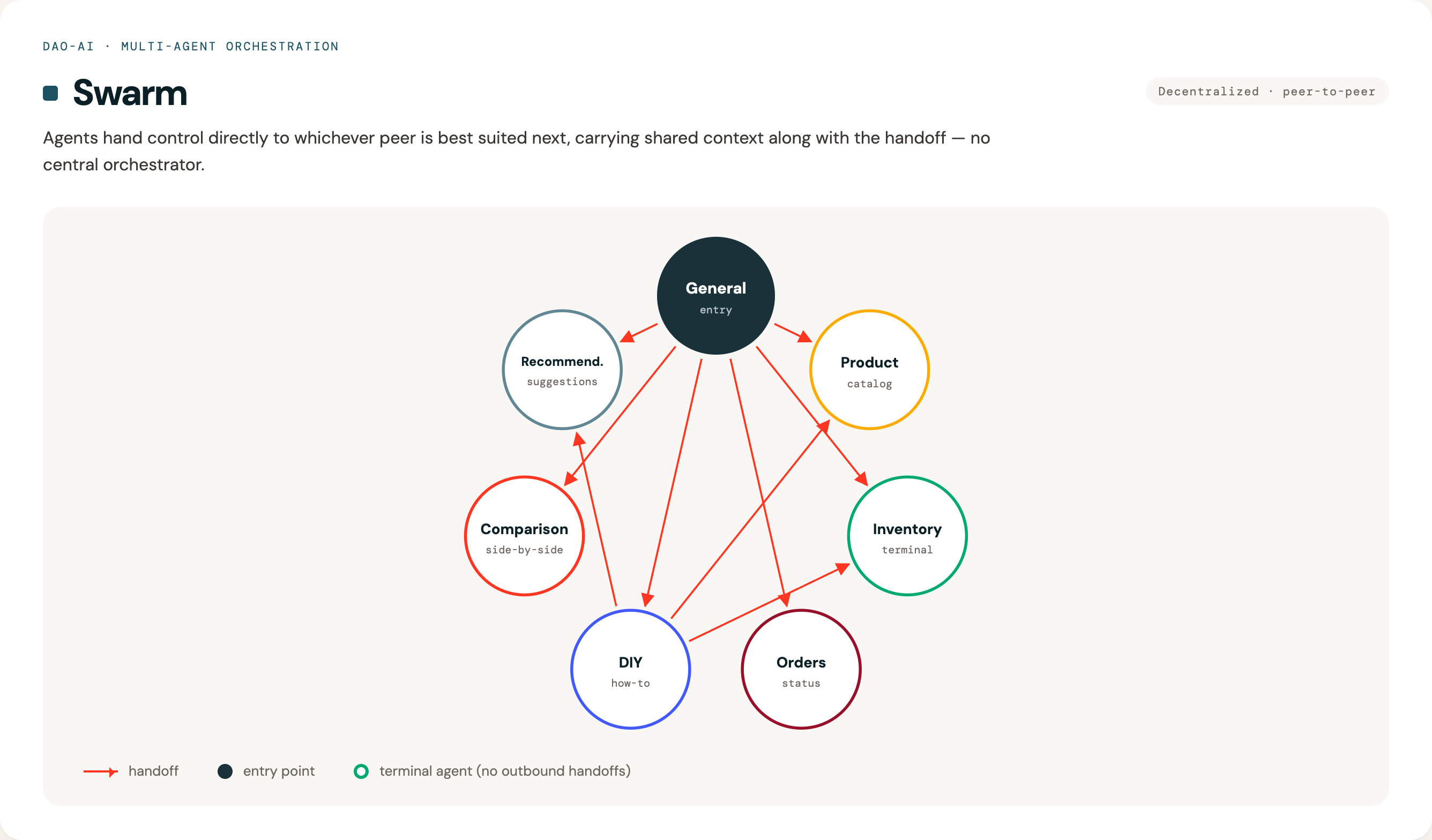
Agents work more autonomously and can directly hand off tasks to each other. Think of it like a team of specialists who know when to involve their colleagues.
Example use case: Complex customer inquiry 1. User: "I need a drill for a home project, do we have any in stock, and can you suggest how to use it?" 2. General Agent (entry point) → Hands off to Product Agent for product info 3. Product Agent checks details → Hands off to Inventory Agent for stock 4. Inventory Agent confirms availability → Hands off to DIY Agent for usage tips 5. DIY Agent provides instructions → Done
No central supervisor needed — agents decide collaboratively.
Configuration:
orchestration:
  swarm:
    default_agent: *general    # Entry point for new conversations
    handoffs:
      general: ~               # Can hand off to ANY agent (universal router)
      diy:                     # DIY can hand off to specific agents
        - product
        - inventory
        - recommendation
      inventory: []            # Terminal agent - no outbound handoffs
Handoffs support two modes: - Agentic (default): A handoff tool is created and the LLM decides when to invoke it. - Deterministic: Control always transfers to the target after the source agent completes, with no LLM tool call.
# Deterministic handoff example (pipeline-style)
orchestration:
  swarm:
    default_agent: triage
    handoffs:
      triage:
        - agent: resolver              # HandoffRouteModel
          is_deterministic: true        # always route here after triage
      resolver:
        - agent: summarizer
          is_deterministic: true        # always route here after resolution
        - escalation_agent              # agentic: LLM can choose to escalate
Handoff constraints (requires)
Agents can declare prerequisite agents that must have run before they can be reached. This prevents the LLM from peer-routing past required intermediate agents — for example, jumping straight to checkout without ever visiting cart.
Declare prereqs on the constrained agent:
agents:
  checkout: &checkout
    name: checkout
    model: *default_llm
    prompt: ...
    requires: [cart]   # cannot be reached until 'cart' has appeared in message history
The swarm graph is unchanged in shape — the constraint is a property of the target agent, not of any specific handoff edge:
orchestration:
  swarm:
    default_agent: *triage
    handoffs:
      triage:   [cart, checkout]    # 'checkout' edge allowed; refused at runtime
      cart:     [checkout, triage]
      checkout: [triage]
Behavior:
- triage → cart → checkout proceeds normally.
- triage → checkout (skipping cart) returns a refusal ToolMessage:
Cannot hand off to 'checkout' — requires [cart]; called so far: [triage].
Pick a different handoff or continue working.
active_agent stays on triage; the LLM self-corrects on its next step.
Semantics: any-order, all-of. Every agent in requires must appear in message history (any order) before the handoff is allowed.
Validation (config-build time):
- requires entries must reference declared agents.
- Self-reference (A.requires containing A) is rejected.
- Cycles in the requires DAG are rejected (unsatisfiable).
- Deterministic handoffs to a target with non-empty requires are rejected — deterministic edges fire unconditionally, which contradicts the constraint. Use an agentic handoff for constrained targets.
The check uses the agent name tagged on each AIMessage (message.name), iterating state["messages"] to determine which agents have run. No new state schema; no graph topology change.
Currently swarm-only. The same field will apply to supervisor routing in a future release.
3. Parallel Fan-Out Pattern
Best for: Independent enrichment, multi-source research, and judge/critic patterns — anywhere one request should trigger several specialists concurrently, then a single synthesized answer.
A cohort is one handoff entry where the source agent lists multiple sibling agents under agents: and a shared reducer under join:. When the source's LLM invokes several parallel handoff tools in a single turn, LangGraph runs the targeted siblings in the same superstep — true concurrent execution — and runs the join exactly once after all fired siblings complete. The end user sees one final response from the join.
Example use case: Product Q&A that needs pricing, stock, and policy info together
- User: "What does the DeWalt drill cost, do you have it, and can I return it if I don't like it?"
- Triage agent decides to consult pricing, inventory, and policy — invokes all three handoffs in a single LLM turn
- Pricing / Inventory / Policy agents run concurrently in one superstep
- Their outputs are appended to
messagesvia theadd_messagesreducer - Synthesizer (join) runs once, produces the final unified answer for the user
Configuration:
orchestration:
  swarm:
    default_agent: *triage
    handoffs:
      triage:
      - agents:                        # cohort: fan-out siblings
        - pricing_agent
        - inventory_agent
        - policy_agent
        join: synthesizer_agent        # shared join reducer
      pricing_agent: []                # terminal — sibling
      inventory_agent: []              # terminal — sibling
      policy_agent: []                 # terminal — sibling
      synthesizer_agent: []            # terminal — final answer
You can mix a cohort with regular single-target handoffs on the same source (agentic peer, deterministic peer, and cohort in one handoffs entry).
Rules dao-ai enforces at load time:
- A cohort entry must set both agents (≥ 2 distinct siblings) and join. agent (singular) and agents are mutually exclusive on one entry.
- is_deterministic is not meaningful on a cohort entry — the join is always reached deterministically after fan-in.
- The join must not also appear in agents.
- A sibling cannot belong to two cohorts with different joins.
- Nested fan-out (a sibling being the source of another cohort) is out of scope.
- Cycles containing any parallel or deterministic edge are rejected.
Prompt tip: the LLM decides which siblings to invoke, so tell the source agent explicitly to "call ALL parallel handoff tools in a single turn" when that's the intent. If the LLM invokes a subset, only those run before the join. If it invokes zero, the source terminates and the join does not run.
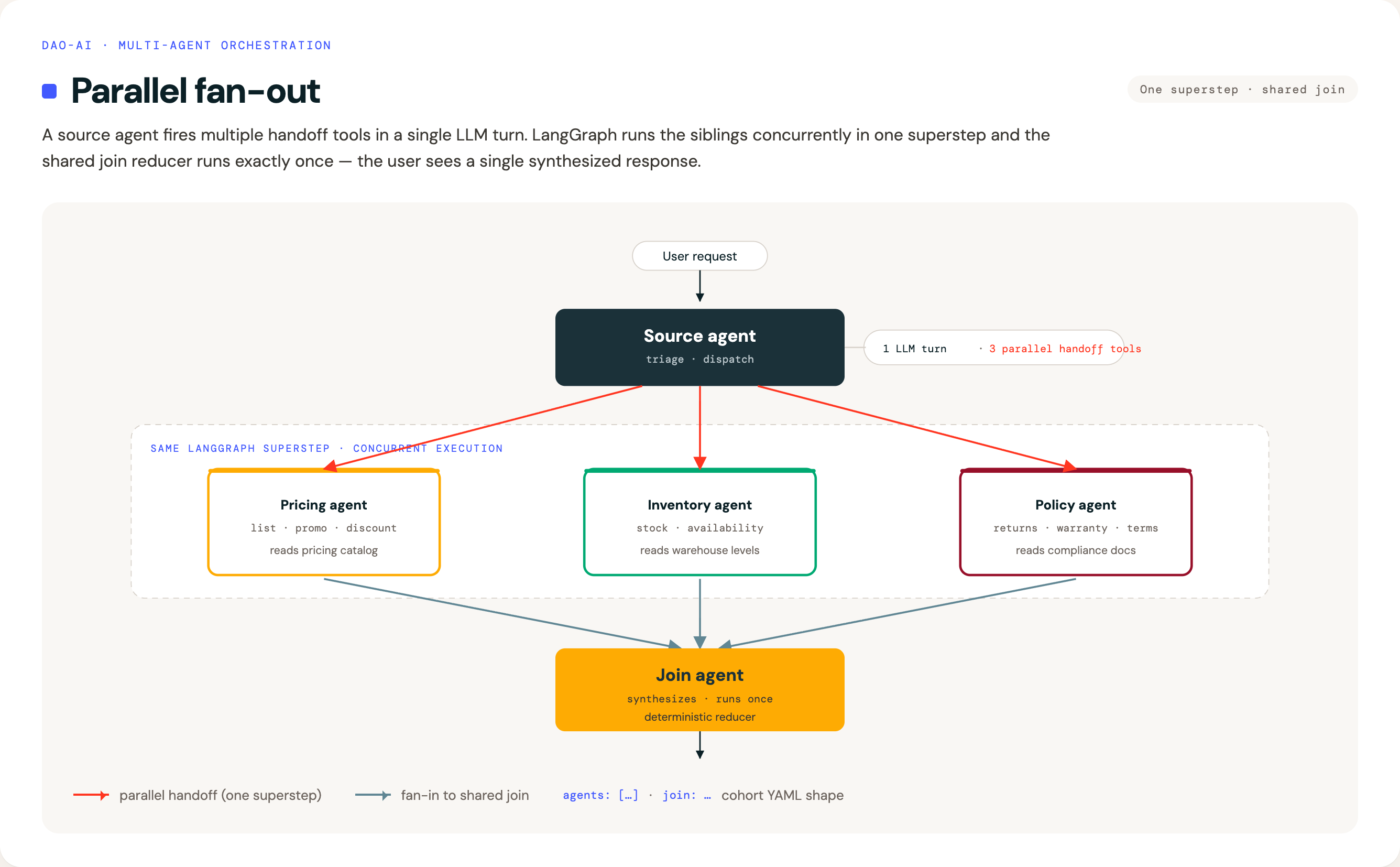
See examples/13_orchestration/parallel_fan_out_pattern.yaml for a complete deployable example.